On this page
If you run traffic through a tracker, it needs to know what happened to each lead. The integration works like this: the tracker passes the ID of its click to the network, and the network returns it in a postback when the lead changes phase.
This page describes the network side in detail: which flow fields to fill in, which site to download and what the postback must look like. The tracker side is brief. Tracker menus and setting names change, so look up the current names in the tracker's own documentation. There are ready-made options for AlterCPA Lite / One / Red, Keitaro and Binom. Any other tracker connects the same way, see Another tracker.
How the integration works#
- The tracker sends the visitor to your flow URL and adds its macro to the URL: the click ID. If the site is hosted in the tracker itself, the macro goes into a hidden form field.
- The network saves the value in the click's tag and stores it with the lead.
- When the lead changes phase, the network calls your postback and inserts the saved value with the tag's macro, for example
{subid}. The tracker uses this value to find its click and record the conversion.
Put the click ID into one tag and return the same tag in the postback with its macro. The table shows which tag each tracker uses.
| Tracker | Tag | What to enter in the flow field | Hidden field in the site form | Macro in the postback |
|---|---|---|---|---|
| AlterCPA Lite / Red / One | SubID 1 (sub1) |
{click} |
sub1 = {click} |
{sub1} |
| Keitaro | SubID (subid) |
{subid} |
subid = {subid} |
{subid} |
| Binom | SubID (subid) |
{clickid} |
subid = {clickid} |
{subid} |
Where each tracker puts its click ID. The tracker replaces the macros in curly braces in fields and hidden fields, and the network replaces them in the postback.
SubID is the main tag. In the cabinet, you can search leads and clicks by it (Leads and clicks) and calculate statistics by it (Summary statistics). SubID 1 to SubID 5 have no filters or reports. They exist only for exchange with the tracker.
You can put the rest of the tracker's data (campaign, source, creative) into the free fields SubID 1 to SubID 5. The network saves them and returns them with the macros {sub1} to {sub5}. The page Tags and pixels explains what tags are and how to pass them.
Flow URL in the tracker#
Use this method when the landing is hosted in the network and the tracker only sends traffic to it. In the tracker, enter the flow URL as the offer URL. An agency builds the URL in the generator, not in a flow: For agencies.
-
Open the flow. In the Flows menu, select Flows by offers and click the flow name.
-
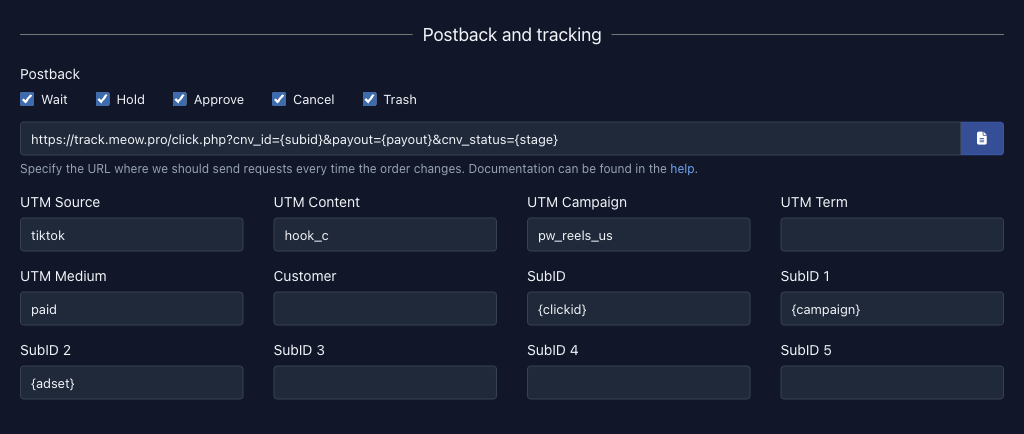
Enter the tracker macro. In the Postback and tracking section, enter the macro in the tag field from the table above: for example,
{clickid}in the SubID field for Binom or{click}in the SubID 1 field for AlterCPA Lite / One / Red. The value saves automatically, and the flow URL at the top of the page updates. -
Copy the flow URL. It already contains a parameter with your macro, for example
sub1={click}. The URL changes when you edit the settings, so copy it after your last change (Flow URL and name). -
Paste the URL into the tracker. Enter it as the offer URL. The tracker's documentation says where.
 123
The SubID field is usually there, but SubID 1 to SubID 5 appear only if the offer or the network allows them. If the field you need is missing (for example, SubID 1 for AlterCPA Red), add the parameter to the URL in the tracker by hand: &sub1={click}, or ?sub1={click} if the URL has no ? yet. The network reads tags from the URL regardless of the flow fields.
Ready-made site in the tracker#
If your landing or prelanding is hosted in the tracker itself, download the version of the site prepared for it. The forms of such a site get a hidden field with the tracker macro. Downloading ready-made sites describes the download itself. An agency downloads the site on the offer page: For agencies.
-
Click the download icon. In the flow settings, it sits next to each site that the network has prepared an archive for.
-
Select the tracker. In the Download window, select your tracker in the Tracker list and the country for prices in the Country list. While a tracker is selected, the Embed tracker and cloak checkbox is unavailable. It turns on the network's built-in visitor check and does not apply to third-party trackers.
-
Click Download. The browser saves the archive
site-<site ID>.zip. -
Upload the archive to the tracker. The tracker's documentation explains how to add a site. The tracker replaces the macro in the page when it shows the page. If you put the archive on ordinary hosting, the macros stay in the pages as they are, and the network receives the macro text itself instead of a click ID.
Options in the Tracker list:
| Tracker | Option in the list | What is added to the forms |
|---|---|---|
| AlterCPA Lite / Red / One | AlterCPA Red | sub1 = {click} |
| Keitaro | Keitaro (subid) | subid = {subid} |
| Keitaro | Keitaro (utm_term) | utm_term = {subid} |
| Keitaro | Keitaro (utm_medium) | utm_medium = {subid} |
| Binom | Binom (clickid) | subid = {clickid} |
| Binom | Binom (clickid+campaign) | subid = {clickid}, utm_campaign = {campaign} |
Options of the “Tracker” list in the “Download” window. The — any — option adds nothing, except in the case described in Another tracker.
In a prelanding for Keitaro and Binom, the links to the next page also point to a tracker macro. The full table of options with these links is in the description of the function offer/download.
The landing from the archive contains the file api.php, and it holds your API key in plain text. When you upload the archive to a tracker, you put the key on its server. Do not upload the archive to a tracker you do not trust. If the archive may have fallen into the wrong hands, reset your API key.
The landing from the archive sends orders via the API, so you need the Can add orders via API permission (more in Downloading ready-made sites). After you change the flow settings, download the site again and update it in the tracker.
Your own site#
If you build the site yourself, add a hidden field from the table above to the submit form. The field name is the tag, and the value is the tracker macro:
<input type="hidden" name="subid" value="{subid}" />Make sure the form is sent to the network together with this field. The api.php file from the archive passes all the form fields to the network. If you send leads yourself, pass the tag in the subid parameter (for AlterCPA Red, sub1) of the function leads/add.
Postback#
The postback returns lead phases to the tracker. Enter the URL in the Postback field of the Postback and tracking section of the flow, or in the global postback: the Postback item of the Flows menu (for an agency, it is in the Traffic menu), if the network shows it. The flow's URL replaces the global one for the phases checked in the flow, see The main postback. The Wait, Hold, Approve, Cancel and Trash checkboxes choose the lead phases for which the network calls the URL. All five are checked by default, and trackers usually need all of them. An agency has no checkboxes. Its Postback page has its own URL for each phase and a common Global URL, see For agencies. The page Postbacks describes how postbacks work.
The examples below use these macros:
| Macro | What the network inserts |
|---|---|
{subid}, {sub1} |
The value of the lead's SubID or SubID 1 tag: the click ID that the tracker passed |
{utm_term}, {utm_medium} |
The values of the lead's UTM tags with the same names |
{stage} |
The lead's phase as a word: wait, hold, approve, cancel or trash |
{id} |
The lead number in the network |
{cash} |
The lead's commission in any phase |
{paid} |
The commission only for an approved lead (approve), 0 for the others |
{currency} |
The code of the commission currency |
{goal} |
The goal's symbolic code. Empty if the lead has no goal |
Macros that the postback examples use. The full list is in Macros.
The main postback is not sent again if the URL stays the same after the macros are replaced (Protection against repeats). So the URL must contain {stage}. Without it, the tracker receives only the lead's first event.
If a lead has no tag, for example because it did not come through a tracker, the macro is replaced with an empty value, and the tracker does nothing with such a postback.
AlterCPA Red / One / Lite#
The AlterCPA Red / One / Lite tracker has a ready-made integration template for AlterCPA Pro / Cloud. You can use it.
Red's click ID, the macro {click}, goes into SubID 1. For a ready-made site, select AlterCPA Red in the Tracker list.
Example postback:
https://track.meow.pro/postbacks/meow1234?click={sub1}&status={stage}&uid={id}&price={cash}¤cy={currency}&goal={goal}Replace track.meow.pro with your tracker's address and meow1234 with your key from the tracker settings. The tracker defines the URL parameters. The network fills them with its own values: the click ID (click), the lead phase (status), the lead number in the network (uid), the commission (price), its currency (currency) and the goal code (goal).
Keitaro#
Keitaro has a ready-made template for the AlterCPA affiliate network with all the settings. You can use it.
Keitaro's click ID, the macro {subid}, goes into SubID. For a ready-made site, select Keitaro (subid) in the Tracker list. The Keitaro (utm_term) and Keitaro (utm_medium) options put the ID into a UTM tag. Choose them if you want the postback to return the ID in that tag. Then write {utm_term} or {utm_medium} instead of {subid}. These tags are also used in statistics, so use SubID by default.
Example postback:
https://track.meow.pro/meow1234/postback?subid={subid}&tid={id}&payout={cash}&status={stage}&sale_status=approve&reject_status=cancel,trash&lead_status=wait,holdReplace track.meow.pro with your tracker's address and meow1234 with the postback key from the tracker settings. The parameters sale_status, reject_status and lead_status belong to Keitaro. They tell it which {stage} values to treat as a sale, a rejection and a lead.
Binom#
Binom's click ID, the macro {clickid}, goes into SubID. For a ready-made site, select Binom (clickid) in the Tracker list. The Binom (clickid+campaign) option also puts the value of the macro {campaign} into the utm_campaign tag.
Example postback:
https://track.meow.pro/click.php?cnv_id={subid}&payout={paid}&cnv_status={stage}&cnv_currency={currency}Replace track.meow.pro with your tracker's address.
Tell Binom which payout goes with each lead phase. To do that, open the postback's additional settings (“Advanced Settings”) and, in the “Status payout relation” block, leave a payout only for the approved lead:
| Phase | Payout |
|---|---|
wait |
0 |
hold |
0 |
approve |
{payout} |
cancel |
0 |
trash |
0 |
How lead phases map to payouts in Binom. {payout} is written in this table for Binom, and the network does not fill it in here.
If you create an affiliate network template in Binom, enter this in it:
- Name:
AlterCPA - Offer URL template:
{offer_url}&subid={clickid} - Postback URL:
cnv_id={subid}&payout={paid}&cnv_status={stage}&cnv_currency={currency}
The template adds &subid={clickid} to the offer URL itself, so with it you can leave the SubID field in the flow empty.
Checking the integration#
-
Make a click through the tracker. Follow the tracker link that you set up, or open a test click in the tracker itself.
-
Find the click in the network. Open Click overview and find a fresh click of your flow. In the UTM column, the tag
SIis the SubID. The additional SubID 1 to SubID 5 are not shown in the list. They are in the click details window, which the button in the first column of the row opens. The tag must match the click ID in the tracker. -
Create a lead. Place an order on the site, or send a test lead via the API with the same
subidvalue (Test lead). The Send lead manually form in the cabinet does not ask for SubID, so it does not work for this check. -
Open the postback log. It must show a row with the URL, where values replace the macros, and with the tracker's response (Postback log).
If the conversion did not appear in the tracker, check these in order:
- The click's SubID looks like a macro (for example,
{click}): the traffic did not come through the tracker, or the tracker did not replace the macro. The network records what came in the URL. - The click's SubID is empty: the flow URL has no parameter with the macro. Enter the macro in the flow field and copy the URL again.
- The log has no row: neither the flow nor the global postback has a URL, or the checkbox for the phase is not checked.
- The URL in the log has an empty
subid=orclick=: the lead has no tag. For a site in the tracker, check that the hidden field made it into the form and that the form is sent with it. - The tracker received the request but did not count it: compare the parameter names and how the lead phases map to the tracker's statuses.
- Only the first phase arrives: the URL has no
{stage}.
For agencies#
An agency has no flows, so it builds the URL in the Link generator, not in the flow settings. Enter the tracker's click ID macro in the Click ID macro field (tag extu) and the source or affiliate macro in the Affiliate ID macro field (tag exts). The network returns them in the postback with the macros {extu} and {exts} (Tags for agencies). In the postback examples above, replace {subid} or {sub1} with {extu}. The network keeps only Latin letters, digits and the characters -, _ and . in the value and drops the rest.
You can also use the SubID field, like an affiliate. It is in the generator, so the Keitaro and Binom options from the table above work for an agency too, and the postback keeps {subid}. The generator has no SubID 1 to SubID 5 fields, so for AlterCPA Red, add &sub1={click} to the finished URL.
An agency sets the postback in the Traffic › Postback menu: five fields, one for each phase, and a common Global field (Agency postbacks). An agency downloads a ready-made site on the offer page, without choosing a flow (Downloading ready-made sites for agencies).
Another tracker#
A tracker that is not on this page connects the same way:
- Find the click ID macro and the conversion intake URL in the tracker's documentation.
- Enter the macro in the flow's SubID field.
- Set up the postback: the conversion intake URL with the macros
{subid}and{stage}.
If the tracker uses the {subid} macro, like Keitaro, the hidden field for the ready-made site is added automatically. The — any — option puts subid = {subid} into the forms when the flow's SubID field holds exactly {subid}. For other macros, add the hidden field yourself, as in Your own site.