On this page
A postback is a request that the platform sends to your URL when something happens to a lead: it arrives, goes on hold, is approved or is declined. Your tracker or CRM learns the result at once and does not have to poll the API. Postbacks are for tracker integration, for passing conversions and for notifications.
This page shows where to paste the URL, which macros you can put in it and how to check that the request went out. The values reference explains what each lead phase means. An agency has no flows, so instead of phase checkboxes its page has five URLs, one per phase, and a shared URL. See agency postbacks.
How postbacks work#
The platform sends a request when a lead arrives and when its phase changes. There are five phases: Wait, Hold, Approve, Cancel and Trash. In each postback, you mark the phases it reacts to.
The request is a plain GET to your URL, with the macros replaced by the lead's values. The connection takes up to 3 seconds to open, and the whole request takes up to 5. The platform does not follow redirects and does not retry a request. It records every response in the log: the HTTP code, the request time and the beginning of your server's response. If a request did not get through, resend it manually from the log.
There are two kinds of postbacks, and they work independently: one phase change can trigger the main postback and several additional ones.
| Main | Additional | |
|---|---|---|
| Where you set it | The Global postback field on the Postback page and the Postback field in the flow settings | The Add button on the Postback page |
| How many | One shared and one per flow | Any number |
| Tied to | The shared one to all flows, a flow one to its own flow | All offers, one offer or one goal of an offer |
| Fires | When a lead arrives and when its phase or status changes | When a lead arrives and when its phase changes |
| Repeat sends | A URL that has not changed since the last send is not sent | Sent every time |
| Method | GET, optionally POST | GET or POST, including JSON |
| Best for | Trackers | Notifications, CRMs, individual goals |
Two kinds of postbacks.
The Postback page is in the Flows menu. If your network does not show it, the global and additional postbacks are not available to you, but you can still set the main postback in the flow settings.
The main postback#
The main postback is the one trackers expect: a single URL tells them what happened to a lead, and it does not repeat itself. You set it at two levels.
- Global — one for the whole account. The Global postback field and the phase checkboxes are at the top of the Postback page.
- Flow — each flow has its own: the Postback field and the same checkboxes in the flow settings, in the Postback and tracking section. To find and save them, see the flow settings.
The URL sent for a lead in a given phase is chosen like this:
- If the lead's flow has a URL and its checkbox for this phase is selected, the flow URL is sent.
- Otherwise, if a global URL is set and its checkbox for this phase is selected, the global URL is sent.
- Otherwise, no main postback is sent for this phase.
So a flow URL replaces the global one only on the phases marked in the flow. If a flow has only Approve marked, its URL goes out for that phase, and the global URL goes out for the other phases, provided their checkboxes are selected.
To set the global postback:
-
Open the page. Select Flows › Postback in the menu.
-
Mark the phases. Above the URL field are the checkboxes Wait, Hold, Approve, Cancel and Trash. A new account has all five selected. Keep only the phases your tracker needs to know about.
-
Enter the URL. In the Global postback field, enter the URL together with macros, for example
https://track.meow.pro/postback?subid={subid}&status={stage}&payout={cash}. Ready-made URLs for popular trackers are collected on the Third-party trackers page. -
Save. Click Save. The page reloads with the message “Success”.
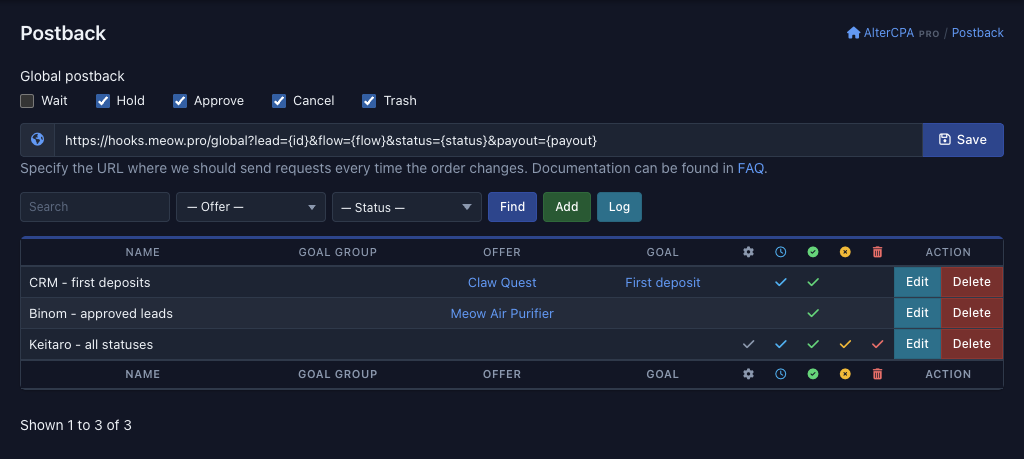 12345
Protection against repeats
The main postback never goes out twice to the same URL. The platform remembers the URL it last sent for a lead, with the values already filled in, and compares it with the new one. If they match, it does not send the request.
This gives you a rule: for your tracker to get every phase change, the URL must contain a macro that has a different value in different phases — {stage}, {phase} or {status}. A URL with only {subid} goes out once, on the first marked phase, and the tracker never sees the other phase changes. The macros {now} and {rand} do the opposite: they give a new value on every send and switch the protection off. Add them only if you need repeats.
Additional postbacks have no such protection.
Sending with POST
The main postback goes out with GET by default. To send it with POST, start the URL with POST:. The part of the URL after the ? becomes the request body. For example, the URL POST:https://track.meow.pro/postback?subid={subid}&status={stage} sends a request to https://track.meow.pro/postback with subid and status in the body.
Additional postbacks#
Use additional postbacks where the main one does not fit: notifications to a messenger, your own CRM, a second tracker, events for one goal only. You can create any number of them. Each works on its own and does not replace the main postback.
To add an additional postback:
-
Open the window. On the Flows › Postback page, click Add. The Add window opens.
-
Name the postback and enter its URL. The Name and URL fields are required. The name only labels the postback in the list and does not affect sending.
-
Mark the phases. A new postback has all five phases marked: keep the ones you need.
-
Add a request body if needed. If the POST body for the request field has any text, the request goes out with POST. Write the body as
foo=bar&baz=123, with the same macros as in the URL. The Send POST in JSON format checkbox sends the same body as a JSON object. -
Bind the postback. Select the Offer. If the offer has goals, select the Goal too. If you leave the fields empty, the postback fires for leads of any offer. Binding is explained in more detail below.
-
Create. Click Create. The postback appears in the list.
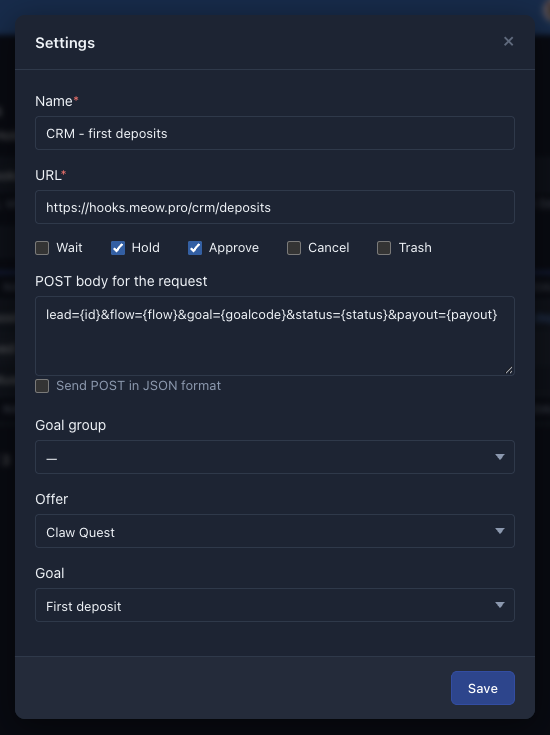 1234
Binding to an offer and a goal
A postback fires only for leads that match its binding.
| What is selected | Which leads it fires for |
|---|---|
| Nothing | Leads of any offer |
| Offer | Leads of this offer, with any goal or none |
| Offer and Goal | Only leads with this goal |
| Goal group | Only leads whose goal belongs to the group. Combines with the other fields |
Binding of an additional postback.
A postback is bound to one offer and one goal. The Goal field appears after you select an offer that has goals. A Goal group combines goals of different offers, for example registrations or deposits. The network defines the list of groups, and the field shows only if there are groups.
For example, a postback to https://hooks.meow.pro/crm/deposits, bound to the goal “First deposit” of the offer Claw Quest and to the phases Hold and Approve, passes only the first deposits for this offer to your CRM.
JSON and the request body
Without the Send POST in JSON format checkbox, the body goes out as is, in the form foo=bar&baz=123. With the checkbox, the same body becomes a JSON object, and its values are strings. For an approved lead 4021 in flow 85 with a commission of 12.50, the body lead={id}&flow={flow}&status={stage}&payout={cash} goes out like this:
{
  "lead": "4021",
  "flow": "85",
  "status": "approve",
  "payout": "12.50"
}
If the POST body for the request field is empty, the JSON checkbox changes nothing: the request goes out with GET.
The postback list
The list on the Postback page shows your postbacks, newest first, 30 per page. Above it are the filters: the Search field (it searches names and URLs), the “— Offer —” list and the “— Status —” list, which keeps only the postbacks that fire on the selected phase. The columns Name, Goal group (if there are groups), Offer and Goal show the binding, and the five columns with icons show the phases. The Edit button opens the same window with the settings, and the Delete button deletes the postback after you confirm.
Agency postbacks#
Agencies find the page in the Traffic › Postback menu. Instead of phase checkboxes, the top of the page has six fields: one URL for each of the five phases (Wait, Hold, Approve, Cancel, Trash) and a shared Global URL.
The URL sent on a phase is chosen like this:
- If the field for this phase is filled in, this URL is sent.
- Otherwise, if the Global field is filled in, its URL is sent. It covers all phases that have no URL of their own.
- Otherwise, no postback is sent for this phase.
-
Open the page. Select Traffic › Postback in the menu.
-
Fill in the phase URLs. Enter URLs for the phases you need, for example separate URLs for Approve and Cancel. Leave the other fields empty.
-
Set the shared URL. If you need one URL for all other phases, enter it in the Global field.
-
Save. Click Save.
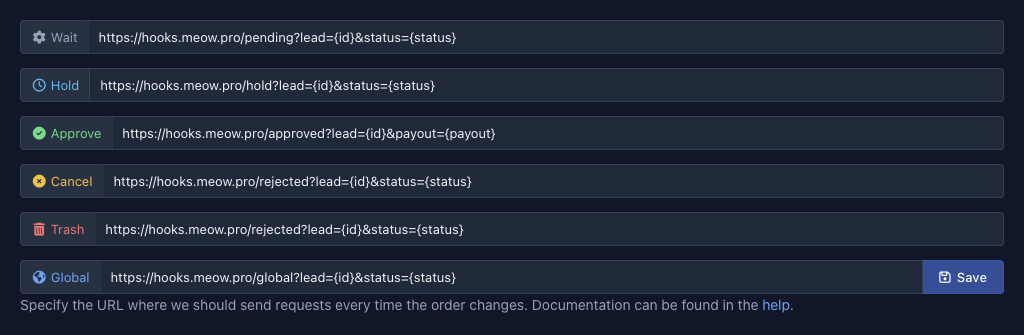 12
An agency has no flows. It takes its links from the link generator, and only the fields on this page affect the main postback. Protection against repeats works as it does for the main postback. Below the fields is the list of additional postbacks. It is the same as for other affiliates, and the phases there are marked with checkboxes. The IDs the agency passes in the extu and exts parameters come back in the {extu} and {exts} macros: see macros for agencies.
Macros#
In a postback URL and in the request body, write a macro in curly braces, for example {id}. The platform replaces it with the lead's value. Values are URL-encoded: a space becomes +, and Cyrillic letters become sequences like %D0%9F. A macro that is not in the tables below is not replaced in the URL. Your server receives the literal {name}, so check the names.
Example. For lead 4021 in flow 85, approved with a commission of 12.50, the URL
https://hooks.meow.pro/leads?lead={id}&flow={flow}&stage={stage}&payout={cash}turns into
https://hooks.meow.pro/leads?lead=4021&flow=85&stage=approve&payout=12.50Lead status
For most trackers, {stage} or {phase} is enough. You need {status} if your CRM cares about the detailed step of order processing.
| Macro | What is substituted |
|---|---|
{stage} |
The lead's phase as a word: wait, hold, approve, cancel or trash |
{phase} |
The lead's phase as a number from 1 to 5 in the same order: 1 — wait, 5 — trash (phases) |
{status} |
The order status in the CRM, a number from 1 to 12 (status reference). The main statuses 2, 4, 5, 10 and 12 exist in every network, and the others come in networks that turned on additional statuses |
{reason} |
The decline reason, a number from 1 to 19, or 0 if there is no reason (reasons reference) |
{custom} |
The lead's text status as your network shows it, for example Processing. An empty string if the network does not show it |
Status and phase macros.
Instead of the ready-made values, you can substitute your own with the {phase:…} macro. It takes five values separated by |, in the order of the phases Wait, Hold, Approve, Cancel, Trash. The macro {phase:0|0|1|2|2} gives 0 for wait and hold, 1 for an approved lead and 2 for a declined lead and trash, and {phase:P|P|A|D|D} suits OctoTracker. Give all five values: a missing phase gets an empty string. Write the values in Latin letters and digits. They are substituted without encoding, and the platform does not send a URL with Cyrillic letters.
Click tags
The tags you passed in the flow URL or in the API come back in the postback. They are explained on the Tags and pixels page.
| Macro | What is substituted |
|---|---|
{subid} |
The SubID tag |
{uuid} |
The UUID tag |
{sub1} … {sub5} |
The tags SubID 1 to SubID 5. {subid1} … {subid5}, {sid1} … {sid5} and {xm1} … {xm5} give the same values |
{utm_source} |
The UTM tag of the source. {utms} and {us} give the same |
{utm_campaign} |
The UTM tag of the campaign. {utmc} and {uc} give the same |
{utm_content} |
The UTM tag of the ad. {utmn} and {un} give the same |
{utm_term} |
The UTM tag of the keyword. {utmt} and {ut} give the same |
{utm_medium} |
The UTM tag of the ad group. {utmm} and {um} give the same |
{customer} |
The tag of the ad customer. {utm_customer}, {utm_user} and {utmu} give the same |
{domain} |
The domain the visitor came to (the “Domain” tag). {host}, {utm_domain}, {utmd} and {ud} give the same |
Click tag macros.
Ad network click ID
Ad networks can pass their own click ID. The platform saves it and returns it in the {cuid} macro. The names you may know from different networks return the same value:
{fbclid}— the Facebook click ID.{gclid}— the Google click ID.{ttclid}— the TikTok click ID.{adclid}— the classic click ID of teaser networks.{unique_id}— the classic click ID of rental apps.{click_uid},{clid},{gbraid},{wbraid},{adsclid},{rb_clickid},{ttlid},{twclid},{msclkid},{yclid},{bbg},{external_id}and{adid}.
Commission
The commission for a lead is passed as a number: a whole sum has no fractional part (12), any other has two decimal places (12.50). Separate macros give the sum only in the phases you need and zero in the others.
| Macro | What is substituted |
|---|---|
{cash}, {price}, {payout} |
The commission in any phase |
{paid} |
The commission only in the approve phase, 0 in the others |
{hold} |
The commission only in the hold phase, 0 in the others |
{holded} |
The commission in the hold and approve phases, 0 in the others |
{currency} |
The three-letter code of the commission currency in lowercase, for example usd |
Commission macros.
Lead, offer and flow
| Macro | What is substituted |
|---|---|
{id} |
The lead number in the network, the same as in leads/list |
{offer} |
The offer ID |
{offername} |
The offer name |
{flow} |
The flow ID |
{site} |
The landing ID |
{space} |
The prelanding ID |
{goal} |
The symbolic code of the offer's goal. Empty if there is no goal |
{goalcode} |
The shared goal code: the code of the network's goal group, or the goal's own code if the goal is not in a group. {goals} gives the same |
{count} |
The quantity of goods in the order |
{mobile} |
The device type: 0 — computer, 1 — mobile |
{ip} |
The lead's IP address |
{geo} |
The two-letter code of the lead's country |
{ua} |
The User-Agent of the lead's browser. If it is unknown, a standard browser string is substituted |
{source} |
The symbolic code of the traffic source, see the flow source |
{srcid} |
The traffic source ID |
{wm} |
The ID of the affiliate who owns the lead |
{date} |
The time the lead arrived, as a UNIX timestamp. {time} gives the same |
{dateutc} |
The time the lead arrived, in RFC 2822 format |
{now} |
The time the postback is sent, as a UNIX timestamp |
{rand} |
A random integer |
{click} |
The click ID in AlterCPA. You usually do not need it |
Lead, offer and flow macros.
Flow data
You can also pass the settings of the flow itself in a postback, for example to send an event to your own service together with a pixel ID. The value comes from the matching field in the flow settings. If the field is empty, an empty string is substituted.
| Macro | Flow field |
|---|---|
{fb} |
|
{fbe} |
FB conversion event. Lead if nothing is selected |
{ga} |
Google Analytics or Tag Manager |
{gad} |
Google Analytics conversion |
{vk} |
VK retarget |
{mtrk} |
Yandex.Metrika |
{mt} |
Mail Target |
{tt} |
Tik-Tok |
{lki} |
Likee |
{fb2i} |
Pixel ID of the Facebook Conversion API block |
{fb2e} |
Event: new of the Facebook Conversion API block. Empty if “don't send” is selected |
Flow data macros.
Macros for agencies
An agency gets back its own IDs that it passed in the extu and exts parameters. Affiliates do not need these macros, and their values are empty.
| Macro | What is substituted |
|---|---|
{extu} |
The ID of the lead or click on the agency's side, passed in the extu parameter. {uid} gives the same |
{exts} |
The ID of the source or affiliate on the agency's side, passed in the exts parameter. {src} gives the same |
{exti} |
The agency's ID in the network |
Agency macros.
Postback log#
The platform records every request it sends in the log: the URL with the values filled in, the body, the HTTP code, the request time and the server's response. The network may limit how long records are kept, and then old records are deleted. Only the owner of the postbacks can see the log.
-
Open the log. On the Flows › Postback page, click Log. The Postback log page opens. For an agency, the path is Traffic › Postback › Log.
-
Find the record. Enter the lead number in the Order field or select a flow in the “— Flow —” list, then click Find. You can also apply the same filters by clicking the order number or the flow name in a row.
-
Open the details. The button with a magnifier (Information) shows the full URL, the POST body and the server's response.
The table shows 30 records per page, newest first. The columns are:
| Column | What it shows |
|---|---|
| Time | When the request was sent |
| Flow | The lead's flow |
| Order | The lead number |
| URL | The URL the request went to, with the macro values |
| Server icon | The HTTP code of the response. Green for codes 200–299, red for the others. 0 means there was no response |
| Clock icon | The request time in seconds |
| Result | The beginning of your server's response |
Log columns.
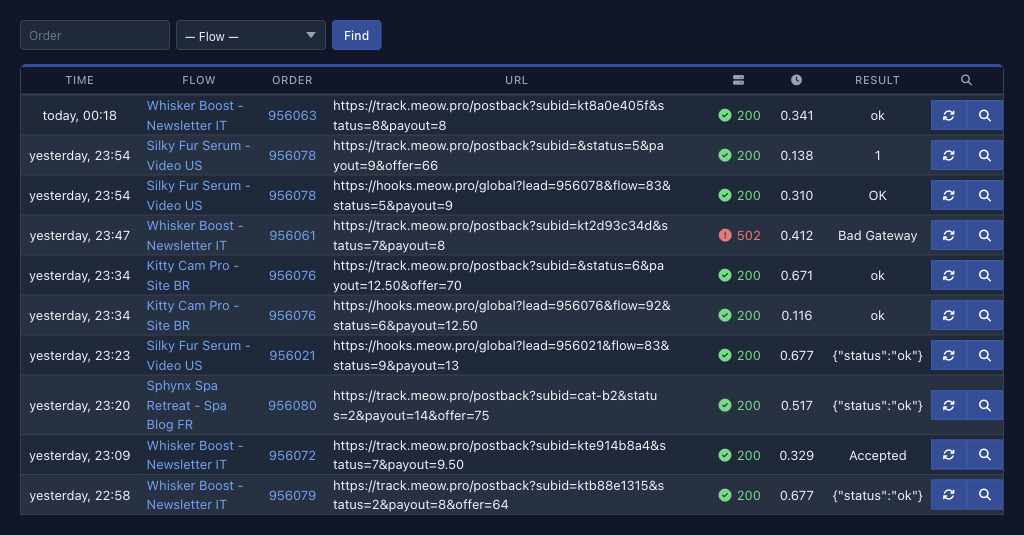 1234
Sending again
You can send any record again with the button with arrows (Send again). The platform asks you to confirm and repeats the request to the same URL with the same parameters. The new send appears in the log as a separate record. This is handy for repeating a postback that did not get through because your tracker failed.
A resend does not rebuild the URL: if you changed the postback in the flow settings, it still goes to the old URL. To send the postbacks for leads again after you edit the settings, contact your network's support.
If a postback did not arrive
| What you see | Possible cause | What to do |
|---|---|---|
| No record for the lead in the log | The checkbox for the phase is not selected, or a main postback with the same URL has already gone out (protection against repeats), or the binding of the additional postback does not fit the lead | Check the checkboxes and the binding, add {stage} to the URL |
| No record in the log although everything is marked | The platform does not send such a URL and does not log it: it does not start with http:// or https://, or it contains spaces or Cyrillic letters |
Check the URL and the {phase:…} values |
Code 0 |
Your server did not respond: it did not accept the connection within 3 seconds or did not answer within 5 | Check that the server is available and how fast it responds, then send again from the log |
| Code 3xx | The platform does not follow redirects | Enter the final URL, for example with https:// instead of http:// |
| Code 4xx or 5xx | Your server returned the error | Open the record details and read the response |
{…} is left in the URL in the log |
There is no such macro | Compare the name with the macro tables |
What to check if a postback did not arrive.